How to Turn Your Audience Into a Distribution Channel
Turn your audience into a distribution channel with a five-rung ladder—attention, trust, offer, sales surface, and economics—not follower vanity.
How to create a storefront as a creator: name the job (route, sell-own, sell-others), pick Linktree, Stan, Beacons, or a co-branded page, then ship one hero offer.

TL;DR: How to create a storefront as a creator starts with the job, not the theme pack. Name whether you need to route clicks, sell your own catalog, or sell someone else’s product. Then pick Linktree, Stan, Beacons, a retailer page, or a co-branded marketplace storefront, publish one hero offer, connect payouts, and put one URL in the bio.
Most creators who ask how to create a storefront as a creator already have a Linktree. They do not have a checkout. They open a theme editor, add twelve buttons, and wonder why nobody buys.
A storefront is a shoppable page tied to your name. The word covers four different surfaces. If you skip the job and jump to a logo, you will pay Linktree’s 12% Free digital-product fee on sales that should have been on a $29 flat plan—or paste affiliate URLs into a sell-own shop that cannot settle a split (Linktree Help; Stan Help).
Creating a storefront as a creator means publishing a shoppable page under your name, picking the surface that matches the money path (route, sell-own, retailer affiliate, or marketplace co-branded), connecting payouts, and putting that single URL where your audience already clicks.
It is not “upgrade my Linktree theme.” A creator storefront is a category label. Link hubs, Stan-class shops, Sephora-style retailer pages, and feat. co-branded pages all use the same noun. The build steps look similar—profile, offer, payments, bio—but the commercial contract is different every time.
If you only need twelve destinations, you are building a hub. If you sell your own PDF or coaching, you are building a sell-own shop. If you promote Amazon or Sephora SKUs, you are joining a retailer program. If you sell a merchant-listed product from a page that carries both brands, you are in the marketplace co-branded job feat. is built for. Name that before you pay a subscription.
Creating a storefront matters because social feeds expire and bios do not. Discovery still happens in Reels and TikToks. Money prefers a stable page with one clear next step and a fee model you can underwrite.
Creating a storefront works when you climb one ladder: name the job, pick the surface, publish one hero offer, connect payouts, then put a single URL in the bio. Skip a rung and you decorate a page that cannot take the right kind of money.
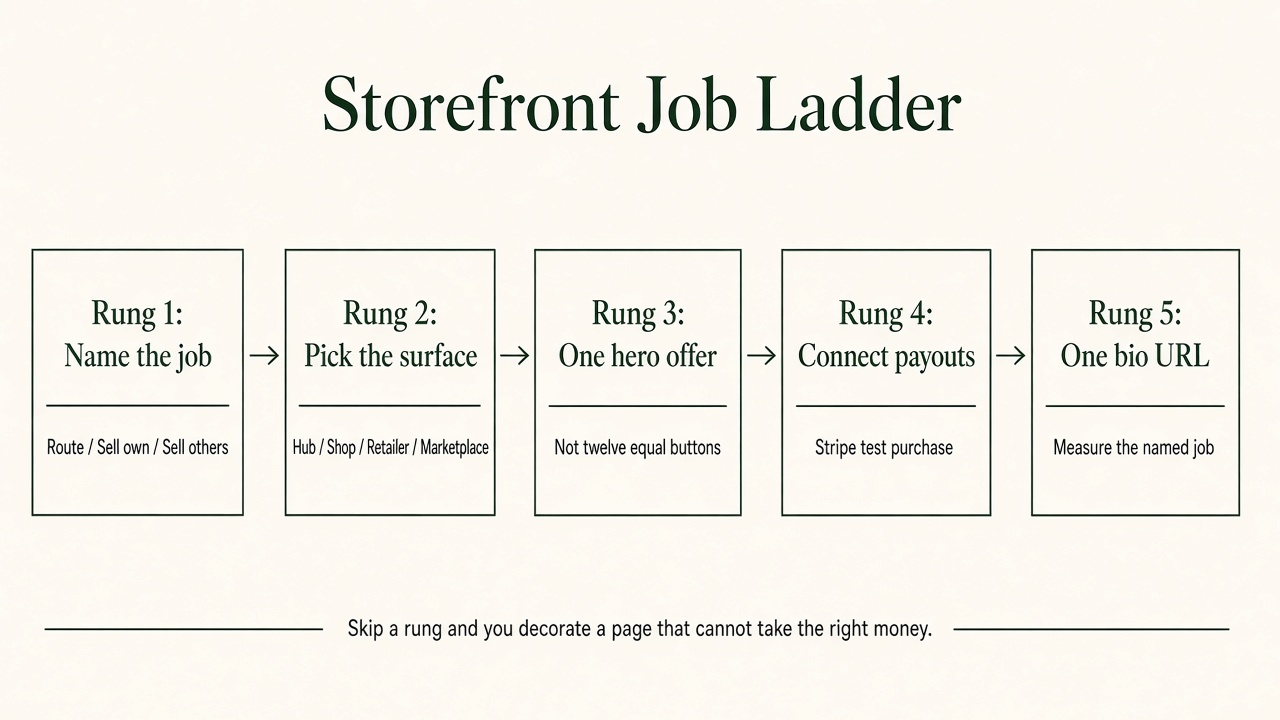
Source: Editorial framework synthesizing feat. four-surface taxonomy with Stan and Beacons launch guidance. https://help.stan.store/article/109-how-to-build-launch-your-stan-store-in-30-mins · https://www.feat.press/blog/what-is-a-creator-storefront
| Job | Success looks like | Surface that fits | Wrong fit |
|---|---|---|---|
| Route | Visitor finds the right destination fast | Link hub (Linktree-class) | Heavy shop with one lonely “links” tab |
| Sell own | Visitor buys your product, course, membership, or booking | Creator shop (Stan / Beacons Store-class) | Free hub still charging 9%–12% after you scale |
| Sell others (retailer) | Visitor buys a retailer SKU attributed to you | Amazon Influencer / Sephora / Walmart-class page | Your own PDF shop |
| Sell others (marketplace) | Visitor buys a merchant-listed product on a co-branded page | feat.-class marketplace storefront | Plain link list with no attribution |
Most ranking “how to set up Stan” posts assume sell-own. That is fine when you own the SKU. It is the wrong ladder when the product belongs to a merchant and you need a split. The taxonomy lives on what is a creator storefront. The fee comparison for hubs versus sell-own shops lives on Linktree vs storefront platforms.
Use help-center fees, not TikTok screenshots.
| Surface / plan | Platform cost shape | Headline sticker | When it wins |
|---|---|---|---|
| Linktree Free | % of digital sales | 12% + Stripe | Pre-revenue routing; testing messaging |
| Linktree Starter/Pro | % of digital sales | 9% + Stripe | Still routing-first with light commerce |
| Linktree Premium | 0% Linktree + sub | ~$35/mo class (confirm pricing page) | High GMV on Linktree commerce |
| Beacons Free / Creator ($10) | % of sales | 9% + Stripe | Beginners who want store + media kit cheaply |
| Beacons Creator Plus | Flat + 0% | $30/mo | Volume that clears ~$333 GMV vs Free 9% |
| Stan Creator | Flat + 0% | $29/mo (or $300/yr) | Sell-own checkout; GMV clears ~$242 vs Linktree Free |
| Stan Creator Pro | Flat + 0% | $99/mo | Email, discounts, affiliate tools on Stan’s ladder |
| Retailer storefront | Commission schedule | Sephora 15% / 15-day (example) | You want the retailer’s catalog and trust |
| feat. co-branded | Revenue split on listed product | Live fees at signup — not invented here | You sell a merchant’s product from your page |
Sources: Linktree Help; Beacons Help; Stan Help; Stan plan comparison; Sephora band via what is a creator storefront.
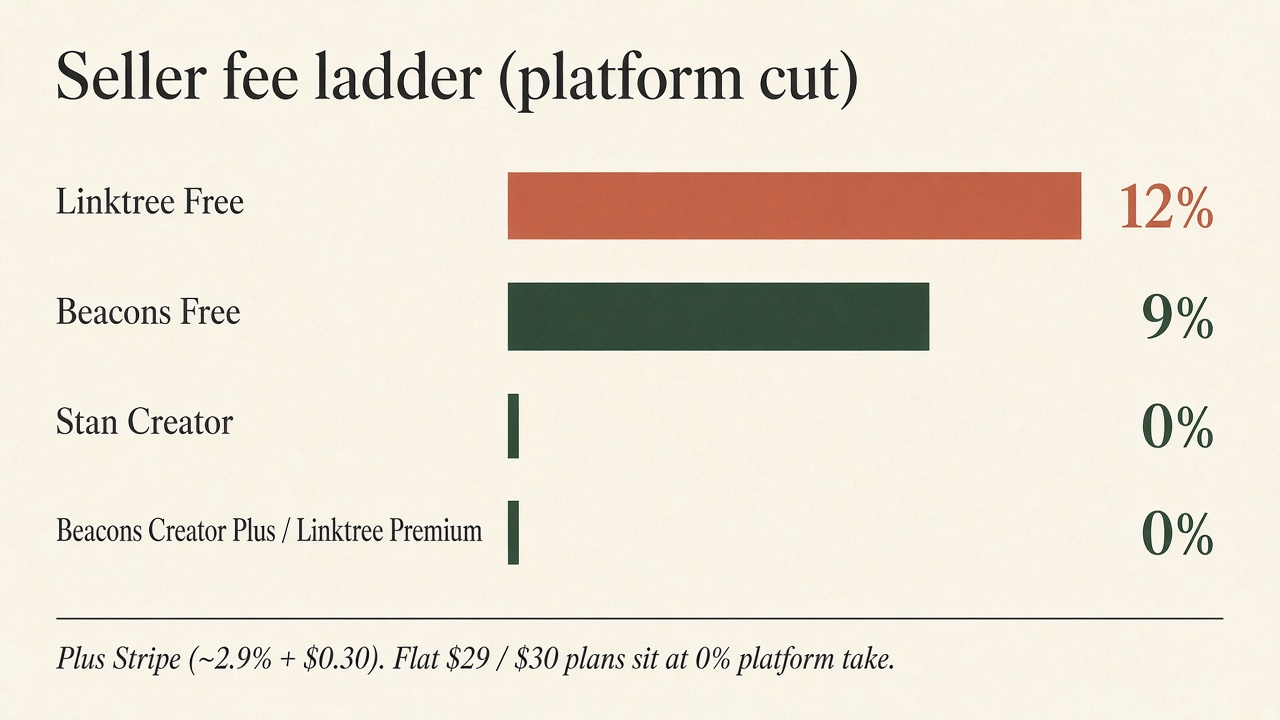
Source: Linktree Help (2025), Beacons Help (2025), Stan Help (2026). https://help.linktr.ee/en/articles/11410206-understanding-transaction-and-processing-fees-on-linktree · https://help.beacons.ai/en/articles/4700289 · https://help.stan.store/article/83-stan-stripes-transaction-fees
Stan’s own launch guide starts with profile, then products, then a free lead magnet, then the bio link (Stan Help). Beacons’ store guide does the same: product, payment processor, bio (Beacons). Reddit sellers who actually move digital goods say the same thing: one hero offer up top, not twelve equal buttons (r/digitalproductselling).
For sell-own: one paid offer you can deliver this week, plus one free lead magnet if you want the list. For sell-others: one merchant or retailer program you can explain honestly, with FTC disclosure on the same surface as the endorsement (FTC endorsement FAQ). For route-only: five links ranked by intent, not by ego.
Stripe (or PayPal where the tool allows) is not optional decoration. Stan documents US Stripe at about 2.9% + $0.30 per purchase plus a payout fee (Stan Help). Beacons lists Stripe at 2.9% + $0.30 and PayPal separately (Beacons Help). Buy your own product once. Fix the broken thank-you page before you soft-launch to strangers.
Replace the old hub only when the new page can finish the job you named. Measure clicks to the hero, checkout starts, paid orders or attributed affiliate sales, and unsubscribes or spam—not likes on the “new storefront” announcement Reel.
Hold Stripe constant and ignore it for a moment. Platform-layer cost ≈ subscription + (seller% × GMV).
| Plan | At $500 GMV | At $2,000 GMV |
|---|---|---|
| Linktree Free (12%) | $60 | $240 |
| Beacons Free (9%) | $45 | $180 |
| Beacons Creator Plus ($30, 0%) | $30 | $30 |
| Stan Creator ($29, 0%) | $29 | $29 |
Original arithmetic from the help-center schedules above. This is not profit. It is the platform cut you can underwrite before processor fees.
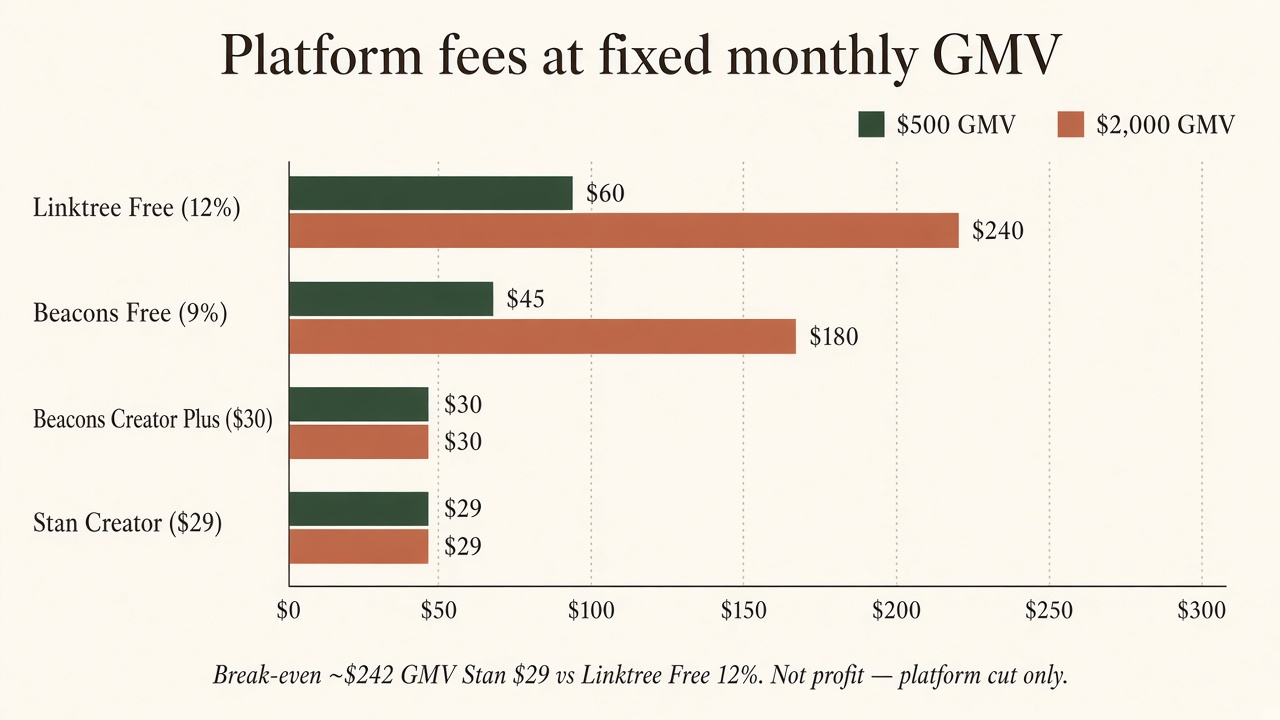
Source: Original analysis from Linktree, Beacons, and Stan help-center fee schedules (2025–2026). https://help.linktr.ee/en/articles/11410206-understanding-transaction-and-processing-fees-on-linktree · https://help.beacons.ai/en/articles/4700289 · https://help.stan.store/article/83-stan-stripes-transaction-fees
If the job is sell-own digital products you created, Stan or Beacons (or Gumroad when you want Merchant of Record) usually wins on published stickers. feat. is not trying to be your Notion-template checkout.
If the job is sell a merchant’s product through a page that looks like yours, with tracking and a revenue split, that is the feat. marketplace job. Browse feat. marketplace, pick a listed product, and use the co-branded storefront the platform generates. Do not invent a feat. fee on this page—live commercial terms appear at signup and in-product. Compare the catalog-link path separately in Amazon Associates vs feat and the software-versus-page gap in affiliate software vs storefront.
Use this sequence once. Each step is at most two sentences.
Q: How do I create a storefront as a creator? A: Name whether you need to route clicks, sell your own catalog, or sell someone else’s product. Pick Linktree, Stan, Beacons, a retailer page, or a co-branded marketplace storefront, publish one hero offer, connect payouts, and put that single URL in your bio.
Q: Is Linktree enough to create a creator storefront? A: Linktree is enough when the job is routing. If you sell digital products on Free, Linktree takes 12% of the sale price plus Stripe (Linktree Help). Once monthly GMV clears roughly $242, Stan Creator’s $29 flat fee usually beats that 12% on platform cut alone.
Q: Should I use Stan Store or Beacons? A: Stan is the cleaner sell-own checkout with $29 or $99 and 0% platform take (Stan Help). Beacons is stronger when you want a free start, media-kit tools, and can accept 9% until Creator Plus at $30 (Beacons Help). Pick by next-ninety-days job, not by vibe.
Q: How is a feat. storefront different from Stan? A: Stan is built so you checkout your own offers. feat. is a marketplace where a merchant lists a product and an approved creator sells it through a co-branded storefront with a revenue split. Use Stan for your SKU. Use feat. when the product is someone else’s and the page should still feel like yours.
Q: Do I need followers before I create a storefront? A: No. You need a clear offer and a place that can take money. Traffic can come from search, communities, or a marketplace before you have a large following—see how to start affiliate marketing with no audience. A storefront without an offer is just a theme.
How to create a storefront as a creator is a job ladder, not a branding weekend. Name route, sell-own, or sell-others. Pick the surface whose published fees match your GMV. Ship one hero offer, connect payouts, and put one URL in the bio. Everything else is decoration.
If the product you want to sell is already listed by a merchant and you want a co-branded page instead of a raw affiliate link, start on the feat. marketplace.
Turn your audience into a distribution channel with a five-rung ladder—attention, trust, offer, sales surface, and economics—not follower vanity.
Affiliate marketing for small creators works on trust density: one problem, one offer class, one surface, EPC math (median ~$0.14), FTC disclosure—not a follower floor.
How to sell someone else's product online: affiliate link, co-branded storefront, dropshipping, or reselling. Compare what you own, risk, and keep.