Affiliate Marketing for Startups: Complete Guide
Affiliate marketing for startups is an operating system—locks, cost, recruit, rates, tracking, first 100 sales, then diagnose a flat roster.
Stripe Connect explained for creators: charge types, who pays fees, application fees, and the official pricing fork when Stripe or your platform sets rates.

TL;DR: Stripe Connect is Stripe’s multiparty payments stack for platforms and marketplaces. Pick the charge type by who the customer thinks they are paying (direct, destination, or separate charges and transfers). Then pick whether Stripe or your platform owns pricing. Application fees are how you monetize after that choice.
Most creators meet Stripe as a checkout button. The confusion starts when you build (or join) a platform that splits money between merchants, affiliates, and a marketplace. That is when “just use Stripe” becomes Stripe Connect explained for creators as a design problem, not a plugin install.
Connect is how multiparty businesses route payments between sellers, customers, and other recipients, with onboarding, account management, payments, and payouts in one system (Stripe Docs: How Connect works). It is not a vibe. It is funds routing plus liability.
Key takeaways:
Stripe Connect is Stripe’s multiparty payments product for platforms and marketplaces that need to move money between customers, connected accounts (sellers or creators), and the platform itself (Stripe Docs: How Connect works).
For a solo creator selling one PDF, Connect is usually overkill. For a co-selling marketplace, course platform, or affiliate storefront network, Connect is the rails. Merchants onboard as connected accounts. Buyers pay. The platform decides who appears on the bank statement, who eats refunds and chargebacks, and how platform revenue shows up as an application fee or a withheld transfer.
Community threads still argue about legacy Express, Custom, and Standard labels. Stripe has been steering new builds toward Accounts v2 configurations and charge-type choices. Do not treat a 2022 “pick Express” blog as current law. Read the charge-type table and the live Connect pricing page.
This page sits next to creator platform fee comparison (what storefront tools charge) and affiliate commission structures (how you split after the sale clears). Connect is the payment plumbing underneath both.
Wrong charge type is not a styling bug. It changes who the customer thinks they paid, which balance Stripe debits for refunds, and whether your platform can afford thin margins.
Why the choice sticks:
There is no public dataset that crowns one Connect configuration as best for every creator platform. Anyone selling a universal answer without your cart shape and liability appetite is guessing.
Stripe Connect works by creating connected accounts, charging customers with one of three charge types, optionally collecting an application fee, then paying out balances on a schedule. Your job is to match charge type to who the buyer thinks is the seller, then decide whether Stripe or your platform owns processing pricing.
| Charge type | Who the customer usually sees | Who Stripe typically debits for fees (default path) | Best fit | Source |
|---|---|---|---|---|
| Direct charges | Connected account (platform often invisible) | Configurable; connected account or platform | SaaS / tools for sellers (Shopify-style tools, Thinkific-style courses) | Charges |
| Destination charges | Platform for products provided by connected accounts | Platform | Marketplaces and branded services (home rental, rideshare-style) | Charges; Destination charges |
| Separate charges and transfers | Platform; funds split later to one or many accounts | Platform | Multi-seller carts, pay before destination is known, complex splits | Charges |
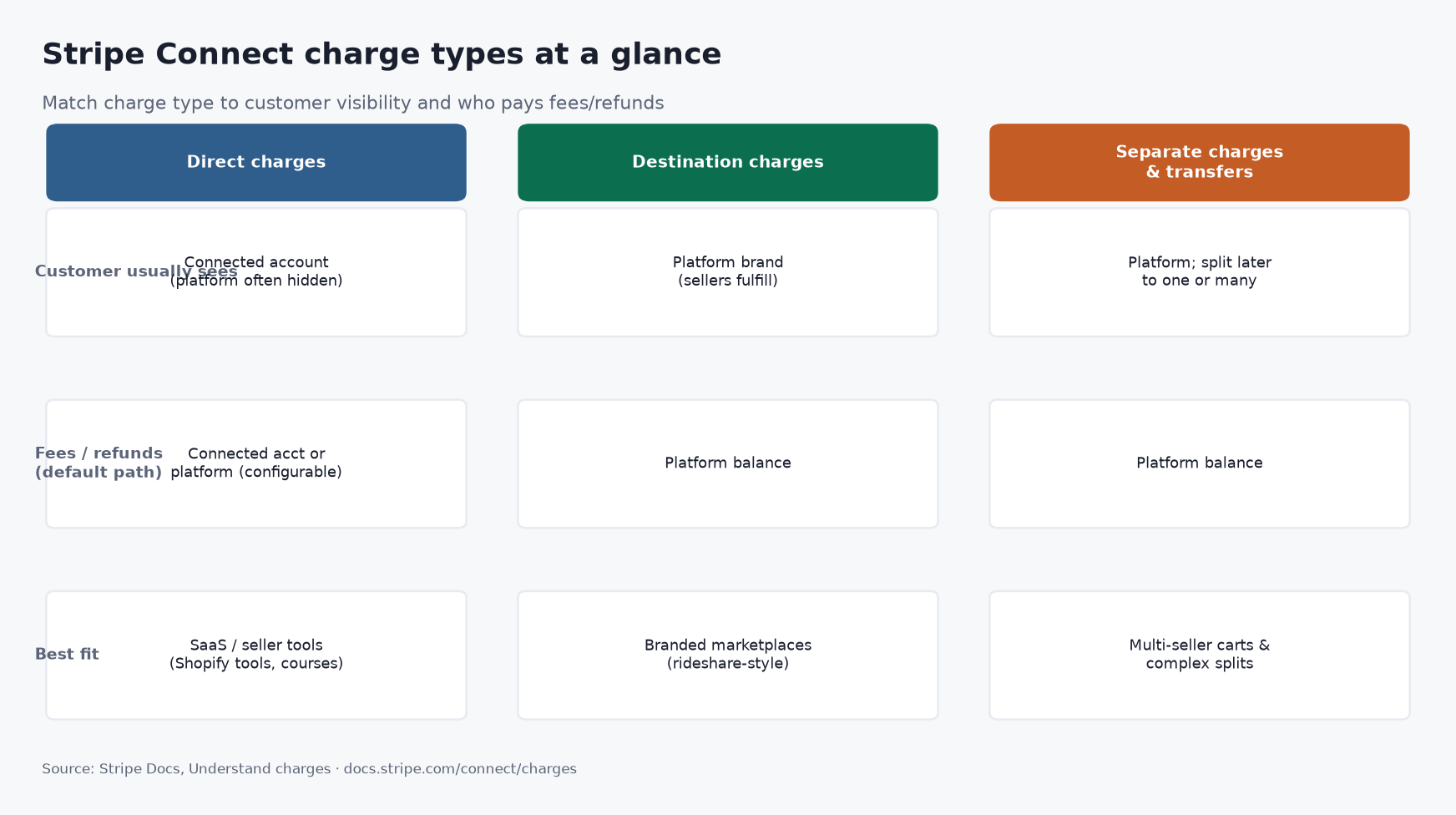
Source: Stripe Docs, Understand how charges work in a Connect integration, accessed 2026. https://docs.stripe.com/connect/charges
Direct charges create the payment on the connected account. The connected account’s balance rises. You can still take an application fee onto the platform. Refunds and chargebacks usually reduce the connected account (Stripe Docs: Understand charges).
Destination charges create the payment on the platform and transfer a portion to the connected account. The leftover can be your fee. Stripe debits platform fees, refunds, and chargebacks from the platform unless you reverse transfers to recover cost (Stripe Docs: Destination charges).
Separate charges and transfers create the charge on the platform first, then move money with one or more transfers. Use this when one cart funds multiple sellers, or when you charge before you know who gets paid. It is the most flexible path and the easiest to mis-ledger (Stripe Docs: Understand charges).
Marketplaces monetize by keeping part of each payment. With destination charges, you set application_fee_amount (or Dashboard pricing rules). Stripe’s documented example uses a $10.00 charge and a $1.23 application fee: the connected account gets the charge net of that fee, about $0.59 in Stripe fees come from the platform balance, and about $0.64 ($1.23 minus $0.59) remains on the platform after those Stripe fees (Stripe Docs: Collect application fees).
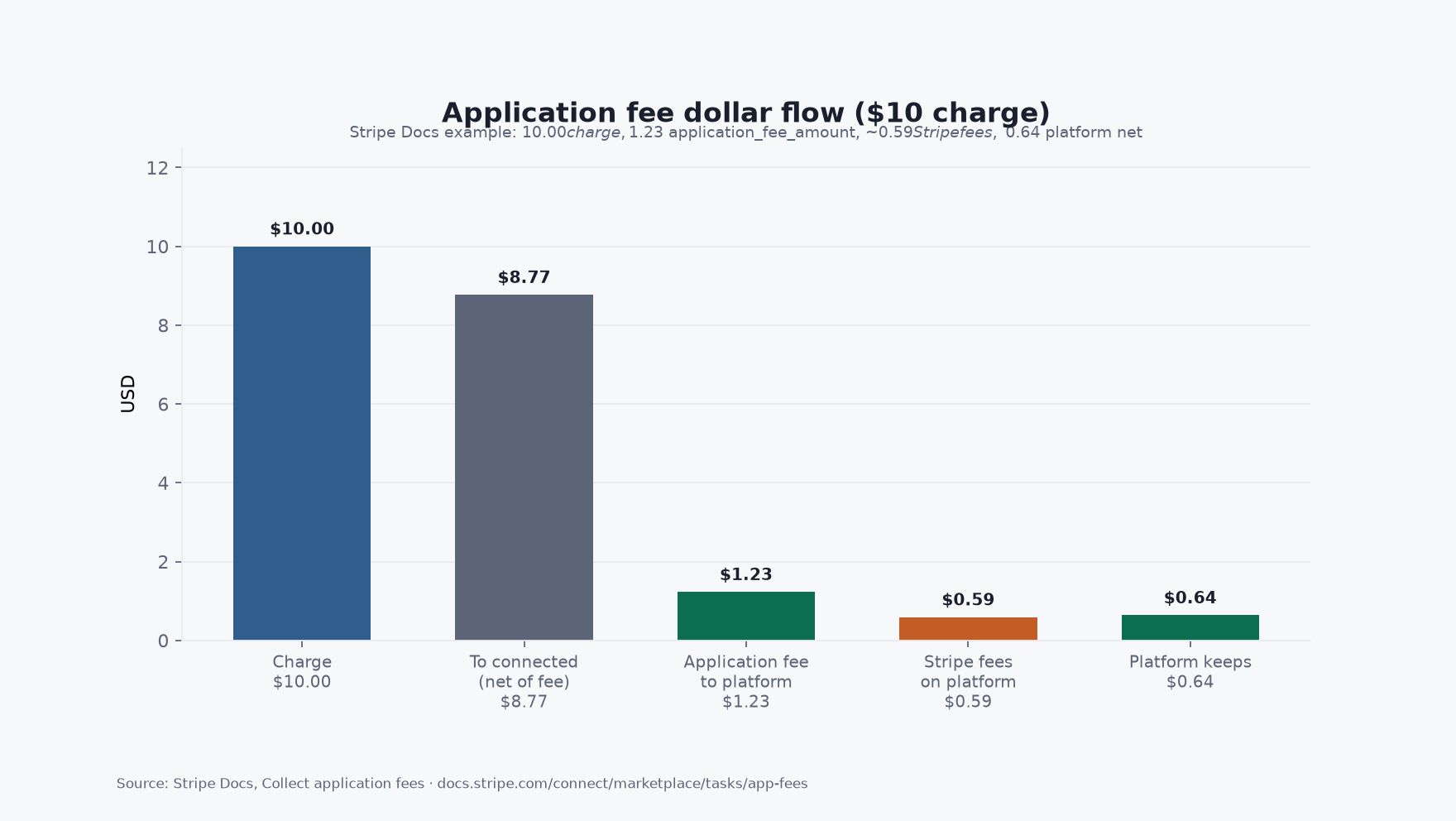
Source: Stripe Docs, Collect application fees, accessed 2026. https://docs.stripe.com/connect/marketplace/tasks/app-fees
If your application fee is thinner than Stripe’s cut on that payment, you lose money on every sale that looks “successful.” That is not a growth hack. That is a ledger leak.
With separate charges and transfers, you often monetize by transferring less than the charge (after Stripe’s processing fee). Stripe’s restaurant-delivery style example: $100 charge, about $3.20 Stripe fee, $96.80 pending on the platform, then $70 to the restaurant and $20 to the driver, leaving about $6.80 as platform fee (Stripe Docs: Collect application fees).
Stripe Connect pricing splits into two models (Stripe Connect pricing):
| Model | Platform account / payout fees (published) | Who sets processing rates | Typical seat |
|---|---|---|---|
| Stripe handles pricing | No additional account, payout volume, tax reporting, or per-payout fees listed for the platform on that path | Stripe sets and collects processing from users; platforms may qualify for revenue share | Platforms that want Stripe’s pricing |
| You handle pricing | $2 per monthly active account; 0.25% + 25¢ per payout; also 0.25% of payout volume for funds routing on that path | Platform sets rates / can pass IC+ | Marketplaces that want their own payments pricing |
Card payments on the same page start at 2.9% + 30¢ per successful card charge. Instant Payouts and cross-border payouts add their own percentages. Confirm live numbers before you ship a pitch deck.
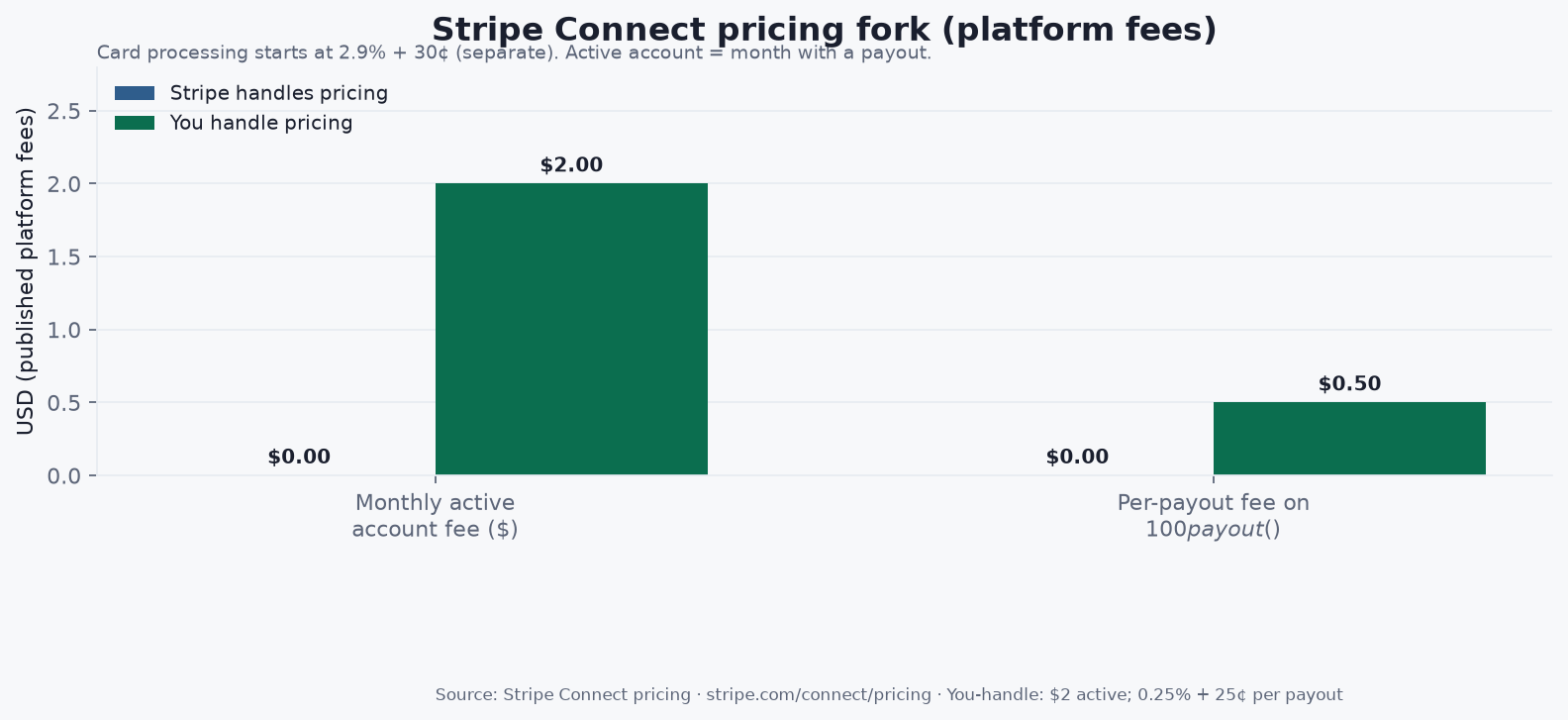
Source: Stripe, Connect pricing, accessed 2026. https://stripe.com/connect/pricing
Reddit operators worry about 0.25% payout fees stacking on thin digital margins. That worry is rational when you handle pricing. It is not a reason to invent a platform cut. Model active accounts times $2, plus payout count times (0.25% + 25¢), plus card fees, then set application fees above that stack.
If you sell your own digital goods through a storefront versus a link hub, you may only need ordinary Stripe Checkout. If you run a marketplace where merchants list and affiliates promote, you need Connect-shaped onboarding and splits. feat. is in that second seat: merchants connect Stripe for paid products; checkout allocates merchant net, affiliate commission, and platform fee per configuration; affiliates get paid through feat. payouts (FEAT_FAQ). Exact live percentages are whatever signup, checkout, and Stripe application fees enforce. Do not copy a deck assumption into a public rate card.
Commission design still matters after rails work. See how affiliate marketing works and best affiliate marketing platforms for the partner layer above payments.
Q: What is Stripe Connect in plain language? A: Stripe Connect is Stripe’s system for platforms and marketplaces to onboard sellers, take payments from customers, route funds to connected accounts, and pay out balances. It is built for multiparty money movement, not for a single creator’s one-off Payment Link.
Q: What is the difference between direct charges and destination charges? A: Direct charges create the payment on the connected account and fit SaaS tools where sellers look like the merchant. Destination charges create the payment on the platform and transfer a share to the connected account, which fits branded marketplaces. Stripe documents both paths and who pays fees and refunds on each (Stripe Docs: Understand charges).
Q: How do application fees work on Stripe Connect? A: You keep part of each payment as an application fee instead of transferring the full amount. In Stripe’s destination-charge example, a $10.00 charge with a $1.23 application fee leaves about $0.64 on the platform after roughly $0.59 in Stripe fees (Stripe Docs: Collect application fees).
Q: How much does Stripe Connect cost? A: It depends on the pricing fork. When Stripe handles pricing, Stripe’s Connect page lists no additional platform account or per-payout fees on that path. When you handle pricing, published figures include $2 per monthly active account and 0.25% + 25¢ per payout, plus card processing that starts at 2.9% + 30¢ (Stripe Connect pricing).
Q: Do creators need Stripe Connect, or is Checkout enough? A: Solo creators selling their own products often need only Stripe Checkout or Payment Links. Connect becomes necessary when a platform must onboard many sellers, split funds, or run marketplace liability. feat. uses Stripe Connect-style accounts for paid merchant checkout; it does not replace reading Stripe’s charge-type docs for your own build.
Stripe Connect explained for creators is a two-step design: match charge type to who the buyer thinks they paid, then pick whether Stripe or your platform owns pricing. Application fees are the monetization layer after that. Use Stripe’s published tables and dollar examples. Refuse universal “just use Express” advice that skips liability.
If you are a merchant who wants distribution through co-branded affiliate storefronts with Stripe-powered splits already in the product path, start at https://www.feat.press.
Affiliate marketing for startups is an operating system—locks, cost, recruit, rates, tracking, first 100 sales, then diagnose a flat roster.
Build a commission-based sales network as a single-tier seller graph—economics, surface, named sellers, then density. Rewardful: only 1.28% of affiliates sell.
Build a product distribution network on four rails—DTC, wholesale, commission sellers, co-branded storefronts. Densify before you scale; Lowe’s pays up to 20% on storefronts.