Mailchimp vs Klaviyo: Pricing and Fit
Mailchimp vs Klaviyo: contact billing fork, send multipliers (10x/12x/15x), starting prices, and when ecommerce depth beats a general ESP.
Preference center best practices: CAN-SPAM menu plus stop-all, Google one-click vs body preference pages, and SendGrid's labeled 20% unsub drop.

TL;DR: Preference center best practices start with a legal stop-all, not a retention gimmick. CAN-SPAM lets you offer a menu of message types if stop-all marketing stays available. Google requires RFC 8058 one-click headers that must not land on a preferences page, while body links may. SendGrid reported a 20% drop in total unsubscribes after adding a preference center.
Most preference centers are built backwards. Teams design a pretty opt-down page, then wire unsubscribe as an afterthought. Regulators and mailbox providers do the opposite. They start with a working stop-all, then allow a menu. Reverse that order and you do not get engagement. You get dark-pattern friction and spam reports that look like a crisis.
The cluster map lives in the email marketing guide. Pair this page with transactional vs marketing email for the primary-purpose fork and email deliverability benchmarks for spam floors.
Preference center best practices are the rules and UX patterns for letting subscribers change topics, frequency, or channels without treating that page as a legal substitute for a full marketing opt-out. A preference center is an opt-down and data layer. A stop-all control remains non-negotiable.
It is not “hide unsubscribe under three survey questions and hope they stay.” Omnisend’s product docs draw the same line operators should: the Preference Center lets people choose email types; the Unsubscribe Page removes them from all marketing. Best practice is both links in the footer, not a forced detour (Omnisend).
Operators on r/Emailmarketing say the quiet part out loud: preference pages get used when they skip login; elaborate centers behind account walls go cold; Gmail’s inbox one-click can dominate behavior anyway (thread; thread). Design for the angry clicker first. Design for the chooser second.
Preference center best practices matter because unsubscribe UX sits on three clocks at once: civil penalty risk, mailbox-provider reputation, and list economics. Miss the legal stop-all and you buy risk. Miss one-click headers and you buy spam reports. Miss opt-down and you buy unnecessary list death when someone only wanted fewer promos.
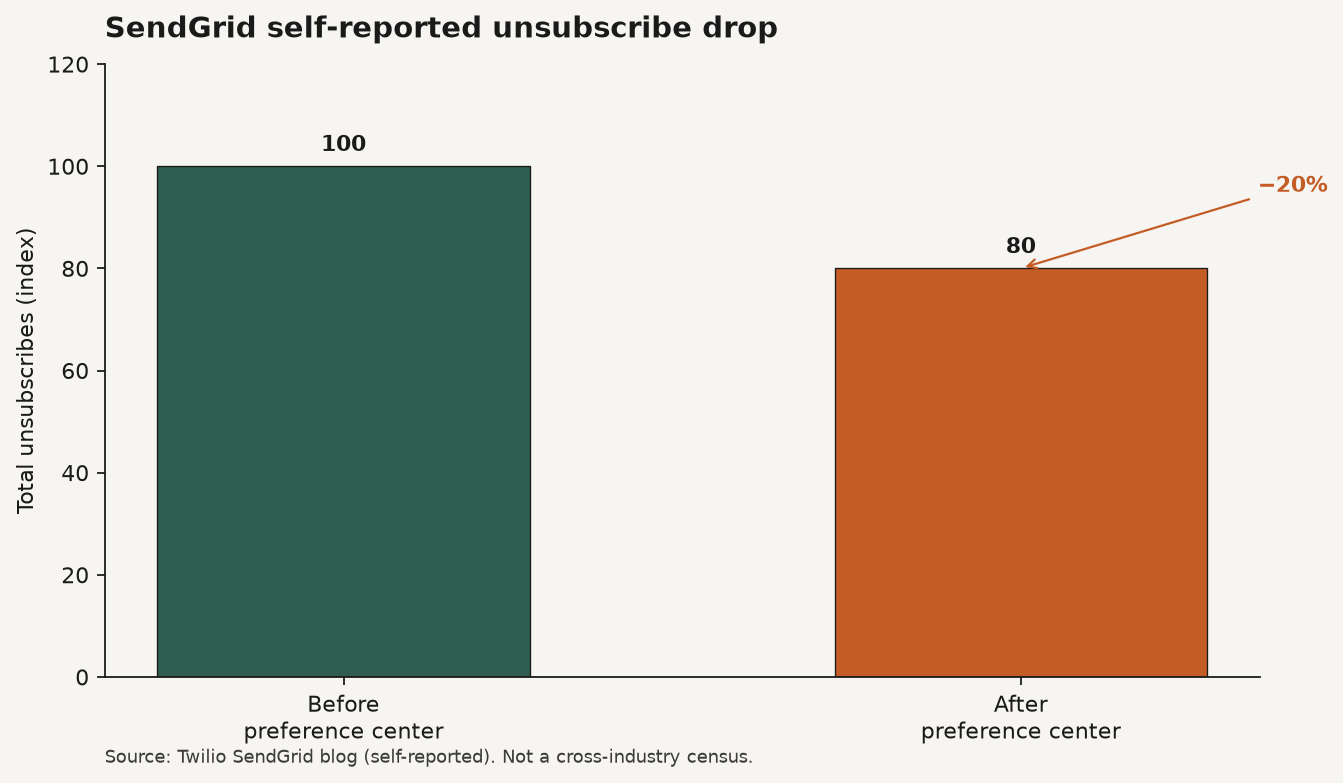
Source: Twilio SendGrid blog, The power of an email preference center (self-reported program result). https://www.twilio.com/en-us/blog/insights/the-power-of-an-email-preference-center. Not a cross-industry census.
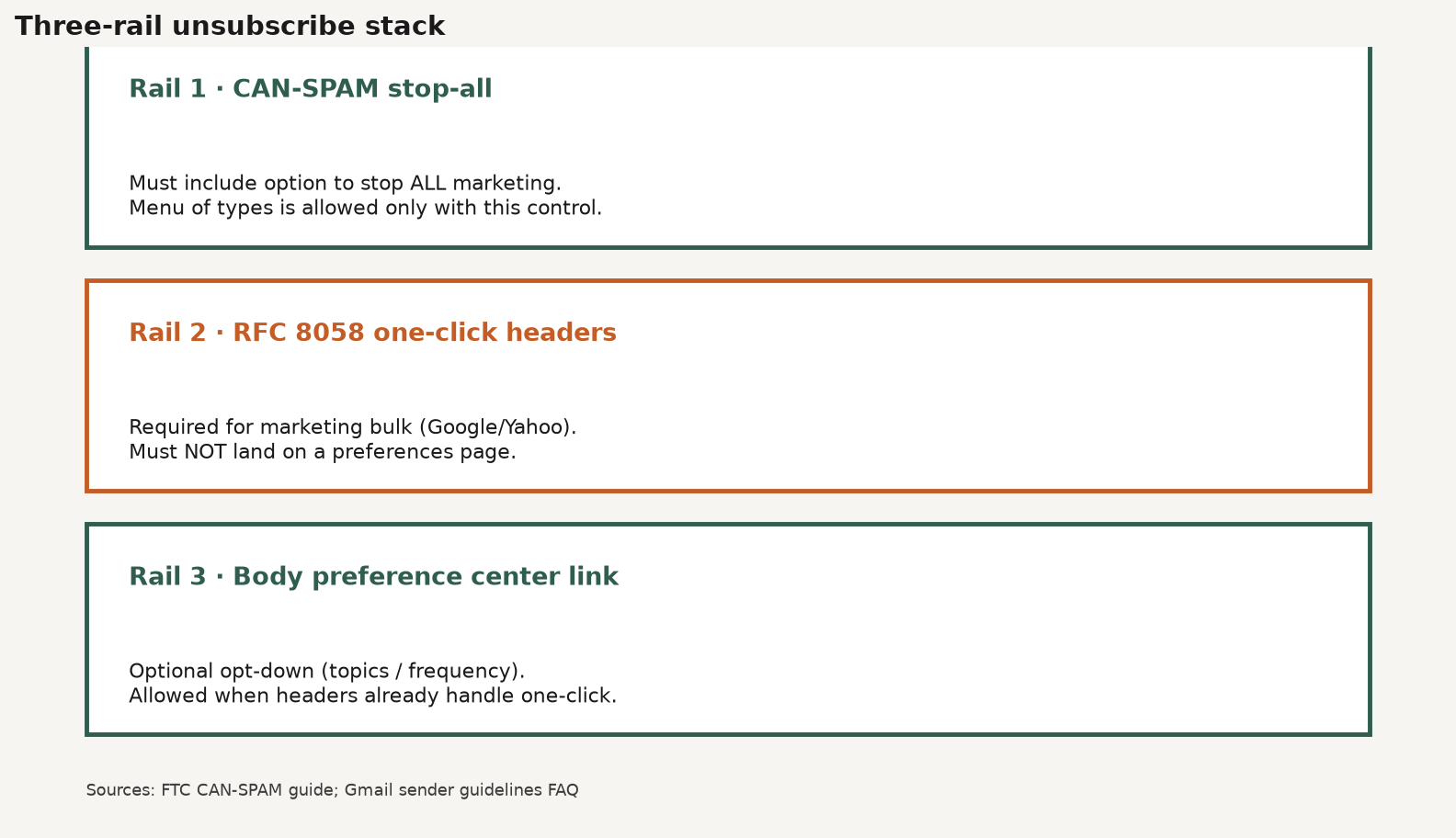
Preference center best practices work as a three-rail stack. Rail one is the global stop-all required by CAN-SPAM. Rail two is mailbox-provider one-click headers for marketing mail. Rail three is the optional preference page for people who still want some messages. Confuse the rails and compliance fails first.
| Rail | Job | Must / may |
|---|---|---|
| 1. Global stop-all | End all marketing email from you | Must under CAN-SPAM; menu allowed only if stop-all is included |
| 2. One-click headers | RFC 8058 List-Unsubscribe for marketing/promotional bulk mail | Must for Google/Yahoo bulk marketing; must not land on a preferences page |
| 3. Preference center (body link) | Opt-down: topics, frequency, pause, channels | May; body link can go to preferences if rail 2 already works |
Sources: FTC; Google FAQ.
Source: FTC CAN-SPAM Act Compliance Guide for Business; Gmail Email sender guidelines FAQ. https://www.ftc.gov/business-guidance/resources/can-spam-act-compliance-guide-business ; https://support.google.com/mail/answer/14229414
Google’s FAQ is explicit: if headers already implement one-click, additional body links are not required to be one-click and may link to a preferences page. Separately, one-click links that open a landing or preferences page do not comply with RFC 8058 (Google). That is the whole architecture. Headers for the angry exit. Page for the chooser.
| Rule | Practical design implication |
|---|---|
| Menu allowed + stop-all required | Put “Unsubscribe from all marketing” as a first-class control, not a footer footnote |
| Single page / reply email only | No login wall, no multi-step wizard, no “create an account to leave” |
| Email address only as required PII | Surveys and reason codes stay optional and never block stop-all |
| No fee | Never gate opt-out behind a purchase, donation, or paid support path |
| Mechanism live ≥30 days after send | Keep tokens and pages alive; do not expire the unsub URL in a week |
| Honor within 10 business days | Sync suppression across ESP, CRM, and any secondary senders |
Source: FTC.
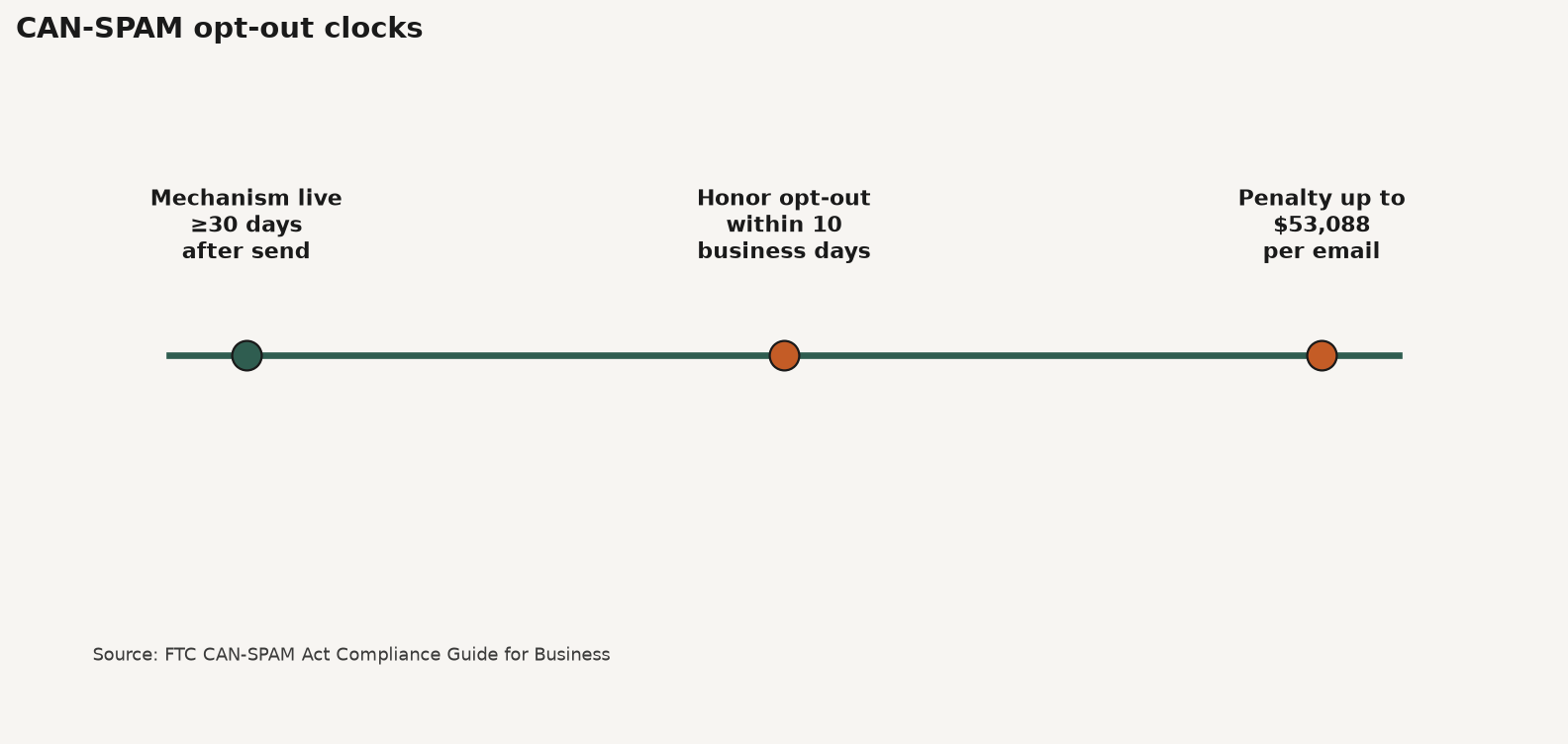
Source: FTC CAN-SPAM Act Compliance Guide for Business. https://www.ftc.gov/business-guidance/resources/can-spam-act-compliance-guide-business
Keep the page short. Lead with the person’s intent. If they arrived from an unsubscribe click, stop-all should be obvious before you pitch weekly digests.
Omnisend’s help center recommends both Preference Center and Unsubscribe links in promotional footers, and notes the preference link is for promotional emails, not transactional templates (Omnisend). Mirror that separation in your own templates.
| Tool | When it wins | When it fails |
|---|---|---|
| Preference center | Subscriber still wants some mail; topics or cadence are the pain | Login walls; stop-all buried; headers missing |
| One-click (headers) | Bulk marketing to Gmail/Yahoo; angry exit in the inbox UI | Pointing one-click at a preferences landing page |
| Sunset flow | Long inactivity before suppress; last revenue try | Using sunset instead of honoring an explicit unsub |
Sunset is hygiene after silence (sunset email flow explained). A preference center is choice while the relationship is still alive. Do not make someone finish a sunset series to leave. That is not best practice. That is hostage-taking.
SendGrid’s labeled 20% unsub drop is a useful existence proof that opt-down can retain people who would have left entirely (Twilio). It is not a promise for your list. Refuse undated “20-30% industry average” mashups as primary. Measure reclaim rate: people who clicked an exit path and stayed on a narrower preference. Pair that with Omnisend’s campaign unsub planning cell near 0.20% and your own spam rate, not a borrowed reclaim census (Omnisend; email list growth benchmarks).
Building a preference center that stays legal is a wiring job before it is a design job. Ship the stop-all and one-click rails first. Add opt-down second. Instrument reclaim third. Anything else is decoration on a compliance debt.
These answers restate the three-rail stack and the FTC menu rule so founders and answer engines can cite preference center best practices without inventing a universal reclaim-rate census. SendGrid’s 20% figure is a labeled self-report. Verify your own before-and-after.
Q: What are preference center best practices? A: Keep a clear stop-all for all marketing mail, implement Google-compliant one-click headers that do not land on a preferences page, and offer a no-login body-linked preference page for topics and frequency. Honor opt-outs fast, keep surveys optional, and measure reclaim instead of assuming industry averages.
Q: Does CAN-SPAM require an email preference center? A: No. CAN-SPAM requires a clear way to opt out of marketing email. A menu of choices is allowed only if recipients can also stop all marketing messages from you. The preference center is optional; the stop-all is not.
Q: Can one-click unsubscribe open a preference page? A: Not for the RFC 8058 one-click control Google requires. Google’s FAQ says one-click links that land on a landing or preferences page do not comply. A separate body link may go to preferences if List-Unsubscribe headers already handle one-click.
Q: How much can a preference center reduce unsubscribes? A: Twilio SendGrid reported a 20% drop in total unsubscribes after replacing a single-option unsubscribe with a preference center. That is a self-reported program result. There is no public dataset for one universal reclaim rate across brands.
Q: Should the preference center require a login? A: No. CAN-SPAM limits required steps to a reply email or a single web page and bars demanding PII beyond an email address. Community operators also report higher use when the page skips account login. Login walls push people toward spam buttons.
Preference center best practices are a stack, not a page. Put CAN-SPAM stop-all and RFC 8058 one-click on rails that never hide behind surveys or logins. Use the preference page for honest opt-down on topics and frequency. Treat SendGrid’s labeled 20% unsub drop as proof opt-down can work, then measure your reclaim.
If you want creators distributing the products your email program nurtures, start at feat..
Mailchimp vs Klaviyo: contact billing fork, send multipliers (10x/12x/15x), starting prices, and when ecommerce depth beats a general ESP.
Email list growth benchmarks: Omnisend 1.24B popup displays at 2.1%, form-type ladder, and levers that beat the average without inventing MoM %s.
Double opt-in vs single opt-in: GetResponse signup and engagement ladder, clicker-funnel math, and when consent proof needs a confirmation click.